Kannamoochi Teaser – ZEE5
DOP: Prasanna S Kumar Colorist: G.Balaji
DOP : Sandeep | Colorist: G.Balaji
My Next NGO job as an colorist for an noble cause about Air Pollution in North chennai.
Hip Hop Tamizha maiden album which I graded 7 years before.
My Next project for Think Music. Introducing Gaana Girl her maiden album in the lines of Hip Hop Tamizha
Coming soon my next feature film as Colorist titled “AADAI”.
Meantime here is the official teaser of the film…
Today another project “Sindhubaadh” as colorist releasing.
Here is the official Trailer of the film. Go and watch it in theatres…

Facebook and RED Digital Cinema announced a collaboration to build the world’s first end-to-end solution for 3D and 360 video capture. Today, we’re excited to reveal a first-look at the Manifoldcamera. RED and Facebook worked closely to build this first studio-ready camera system for immersive 6DoF storytelling, aiming to connect creative professionals with audiences in a bold new way. We’ve made significant strides in realizing this new storytelling device—with plenty more work on the horizon—and today were excited to share the camera’s hardware design and tech specs as we continue on the road to commercial availability.
Filming the Future with RED and Facebook 360
Last May, Facebook and RED Digital Cinema announced a collaboration to build the world’s first end-to-end solution for 3D and 360 video capture. Today, we’re excited to reveal a first-look at the Manifold camera. Read more about it here: http://facebook360.fb.com/2018/09/26/film-the-future-with-red-and-facebook-360/
Posted by Facebook 360 on Wednesday, September 26, 2018
Manifold is a single product that redefines immersive cinematography with an all-in-one capture and distribution framework, giving creative professionals complete ownership of their 3D video projects, from conception to curtain call. What this means for audiences is total narrative immersion in anything shot on the new camera system and viewed through 6DoF VR headsets. It’s nothing short of a paradigm shift in our ability to tell stories.
Picture standing inside of a Hollywood blockbuster instead of simply watching. It’s a common scenario in science fiction—and for good reason—it sounds fantastical. Manifold will make this dreamlike concept a genuine reality, both for content creators and for their audiences. It took years of prototyping and tight collaboration, but results so far point to a revolutionary camera built for a single purpose: to deliver next-generation stories.
HOW IT WORKS
Manifold captures multiple camera angles simultaneously from within a given volume, enabling infinite perspectives to be generated from any direction within a field of view. Using RED’s best-in-class camera sensor design and image processing pipeline, filmmakers get superior image quality when shooting their projects, from live and avant-garde performances to big-budget spectacles. Facebook’s industry-leading depth estimation technology captures 3D information from any scene—like characters, props, and everyday backgrounds—resulting in high-quality video bursting with enhanced volumetric detail and movement.
A key component of the workflow with this camera is a familiar yet powerfully robust post-processing toolset from our partners at Adobe, Foundry, and OTOY. Together with the Manifold camera, it’s everything creators need to ship their projects and we’re optimizing for premium immersive output for Facebook and VR.
Manifold is the first professional camera to fully capture a spherical set of images to accurately recreate entire scenes. The unique combination of camera arrangement and set-ready capabilities makes it an ideal capture tool for professional cinematographers.
Here’s what’s inside:
SENSORS
OPTICS
I/O CONNECTIONS
ACCESSORIES
UI/UX
Manifold will help filmmakers and storytellers craft next-generation stories unlike anything else out there. Our work with RED thus far represents a giant leap forward for immersive cinema and we can’t wait to see what the future holds. Stay tuned for updates on our progress, including pricing, availability, and more.
As Digital Cinema Designer / Editor and recently turned colorist, I have been observing industry from year 2000 from my first film as an Asst Editor for Tamil film Gummalam, the evolution of Film from Negative to Digital Editing to Digital Color Correction to Digital Exhibition to Digital Acquisition in the right order.
Those days when films are telecined for digital video editing and back to Cut List for splicing negative to scanning to Digital Grading, Films are always back to Negative which is mother of all film prints and when Digital Exhibition came the process of exporting digital grades move to file based, instead of going back to Negatives and thus the beginning of not back to Non-Negative storage begins. What it leads to is there is no physical form a film, which was there for 120 years or more. Storing of Film Negatives and maintaining it is an another long story which involves money and more than 95% of Film Labs in India or closed and most Labs sent out notices to producers to take their Negatives from their Labs since they are closing it down but except very few none taken it down and even if taken it down not maintained properly.
With the advent of Digital Exhibition & Digital Camera based Acquisition the Negative loose their existence, which leads to digital storage of feature films as DPX frames stored in Hard Disk and this is only possible method of storing final film outputs from Color Correction stage.
But the real problem with storing final film outputs in Hard disks are, you never know when the harddisk can fail because of physical damage or because of non use of Harddisk which also leads to failure of Hard disk (that means if you are not using an Hard disk for more than 2 or more years it can fail).
Read 6 Worst Reasons of Hard Disk Failure and Data Recovery Solutions for more info.
Then came the multiple backups of data in two or more Hard disk storages but this too can leads to failure of above mentioned reason.
Solutions practised worldwide not just for Feature films and for all financial & non-financial important datas are being archived back to LTO Tapes which are supposed to be retrievable upto 30 or more years if we keep the tape drive along with tapes and computer and is accessories in safe and secure place. The main reason for keeping the LTO Tape Drives along with this is if you are moving for archiving for more 18months or so is, LTO Tapes are evolving and upgrading their storage in capacity from LTO-1 which can store upto 100GB to LTO-7 Tape which now can store upto 6TB uncompressed. Given below evolution of LTO Tapes…
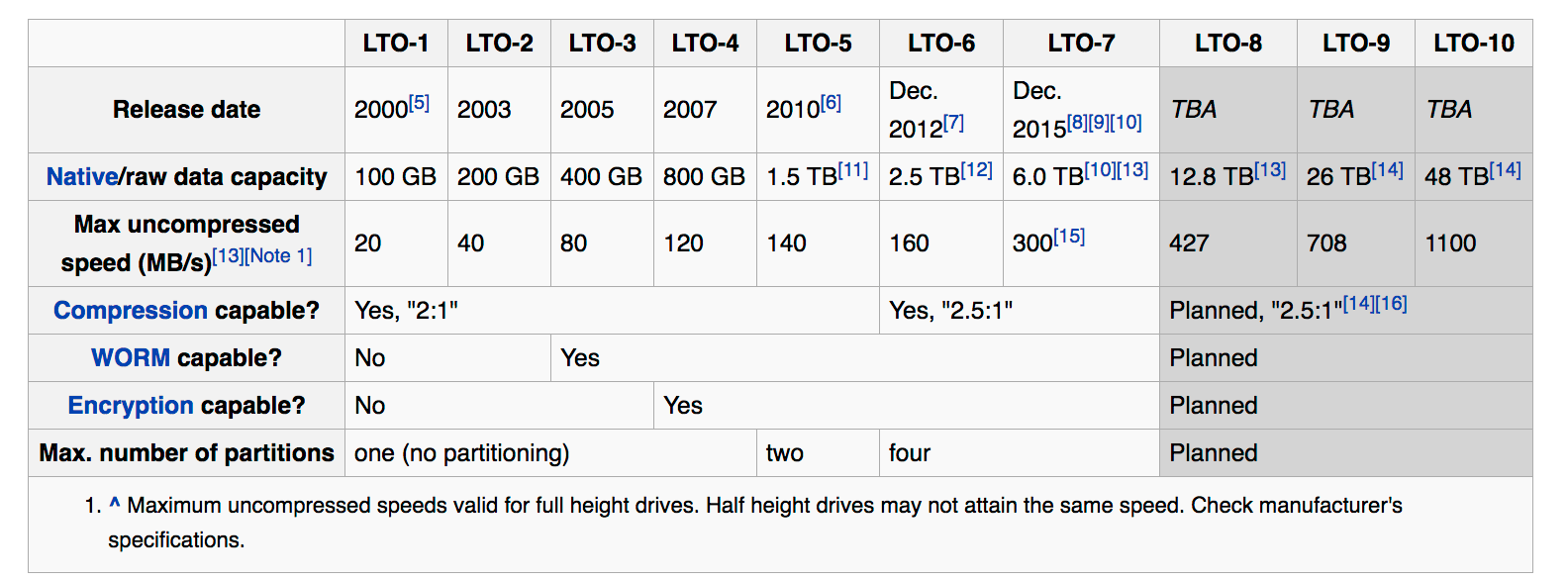
LTO Tape
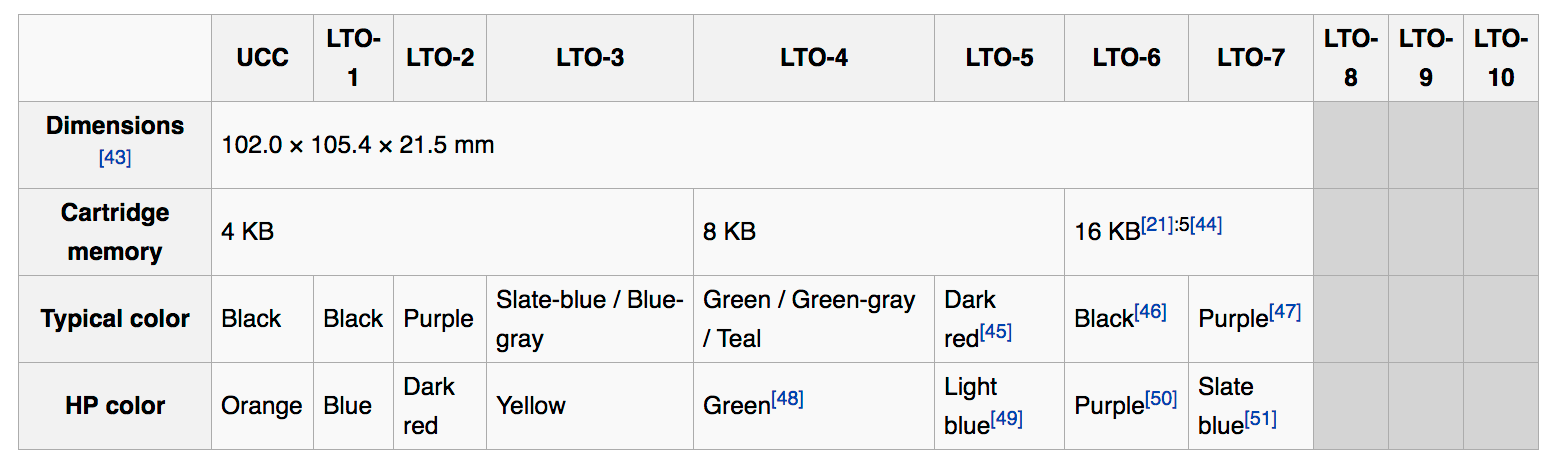
LTO Tape Storage Capacity
SOLID STATE DRIVE:
Then came Solid State Drive based storages which are used primarily for faster Read/Write access to data, since it doesn’t have Physical moving disk, prone to failure is less. SSD got new challenges for data recovery, since it stores data in non-linear and much more complex than existing hard disk drive methods. TRIM command allows an operating system to inform a solid-state drive (SSD) which blocks of data are no longer considered in use and can be wiped internally varies with each operating system.Data integrity of SSDs are relied upon capacitor or some form of battery when power is lost or you disconnect SSD externally or power of your system if fixed internally and it needs to hold power long enough to maintain data in the cache until power is resumed. Most consumer-class SSDs do not have built-in batteries or capacitors.
Reliability of SSDs are not 100% for one simple reason the technology is evolving every day.
ONLINE STORAGE or CLOUD STORAGE:
Other option is to keep your data in Cloud storage which are cheaper day by day but it involves multiple pricing. Certain company like Google Drive or Apple iCloud charge Storage per GB per year, whereas companies like Amazon charge for Storage as well as for bandwidth usage charges for uploading and downloading of data.
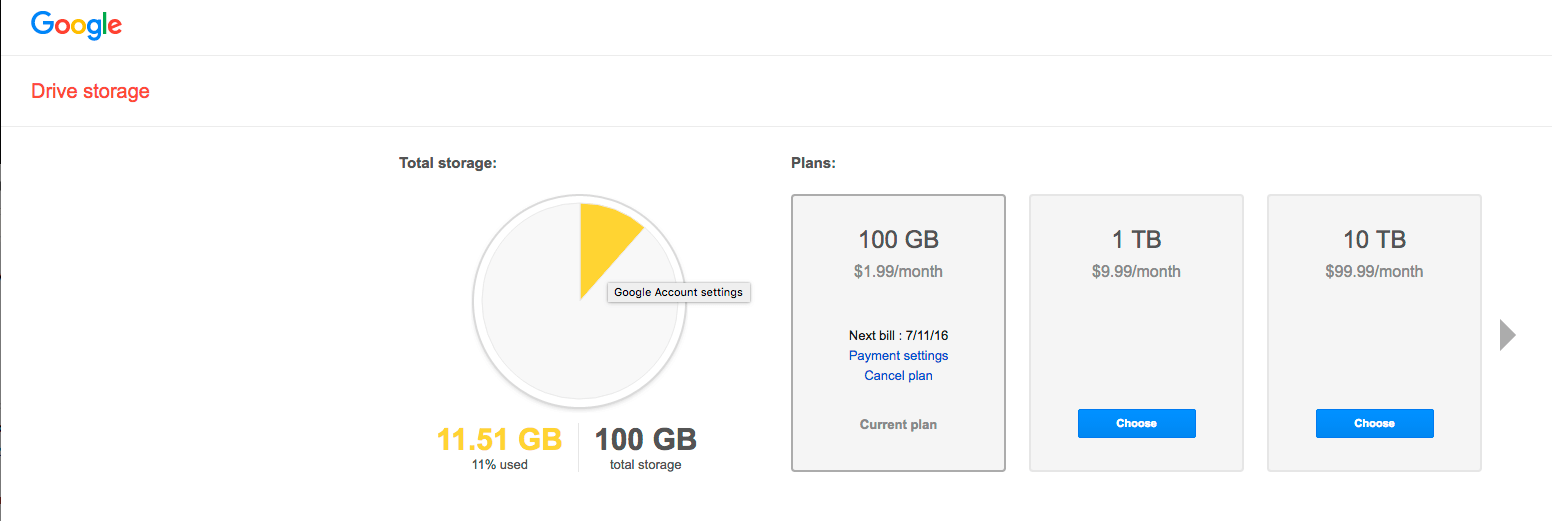
Google Drive Pricing
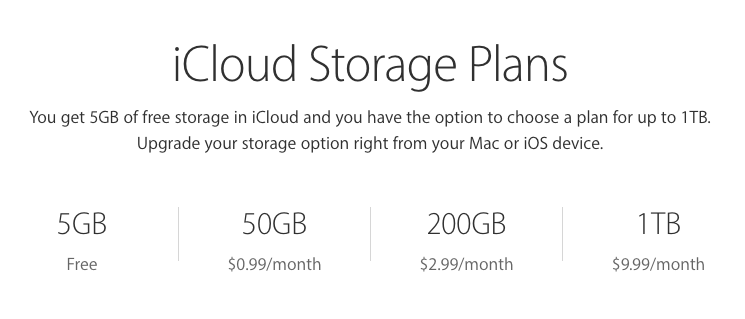
Apple iCloud Pricing
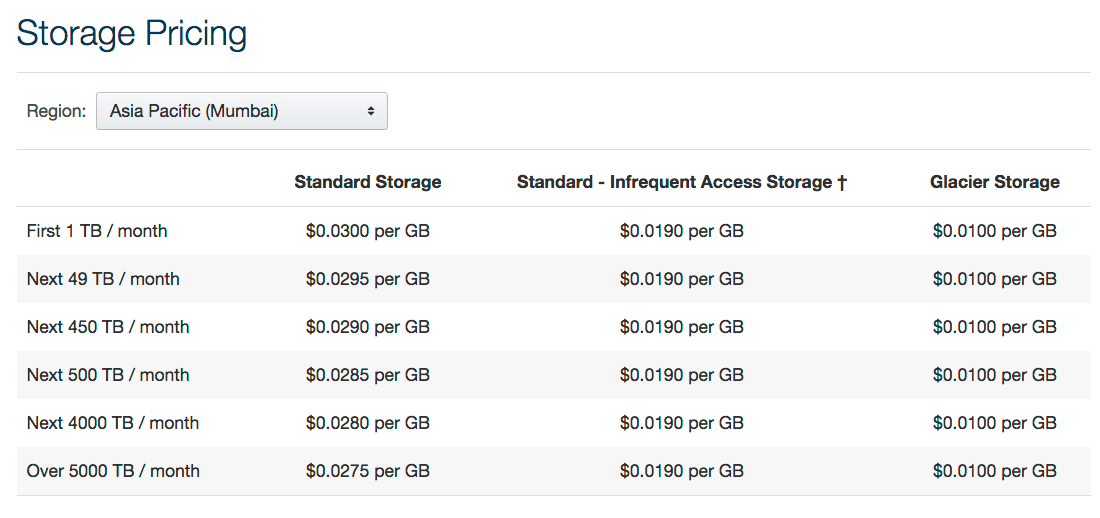
Amazon S3 Pricing
So finally it all depends on how you are going to store your digital data of feature films depends purely based on your budget and how long you want to store. But definitely Hard disk based storage alone is not an ideal solution.
As Digital Cinema Designer we are archiving to LTO-5 / LTO-6 / LTO-7 tapes the following films which we worked till date.
Nenokkadine | Madras | O Kadhal Kanmani | Varutha Padatha Valibar Sangam
Ithu Kathirvelan Kadhal | On A Quest | Nanbenda | Rajni Murugan
Ithu Namma Aalu | Pasanga 2 | Lingaa | Brahmotsavam | Kathakali
Kumari 21F | Orange Mittai | DAVID
And we are also in process of moving to Solid State Drive & Cloud Storage Archiving in coming days.
Film: Kuttrame Thandanai Official Trailer
Director / DOP: Manikandan
Colorist: G.Balaji
I worked on many indian projects for converting subtitles (many think they can do it themselves without any professional help) to Digital Prints (ASC file format) & SRT (TV) & Online / Mobile (SBV and many more) using combination of many subtitle Conversion softwares & Editing Systems.
I ask editors/subtitle creator to do the spotting of subtitles in their beloved NLE (Non-Linear Editing Softwares namely AVID or FCP, Now Premiere is choice of many for their robust many file formats ingesting and playback capabilities without generating offline files) and deliver me the files as Avid BIN / FCP Project or XML file and then I use Annotation Edit or Title Exchange software to generate ASC / SRT / YOUTUBE SBV Subtitle file formats. You can do many file format convertions. Given below in how many formats you convert from & to…
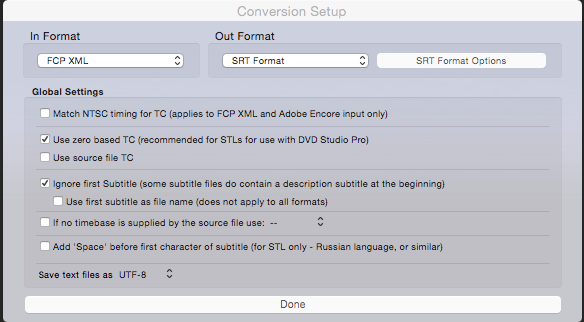
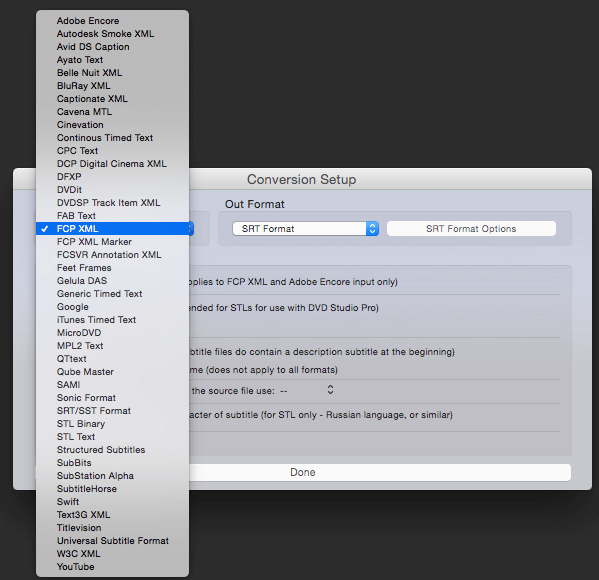
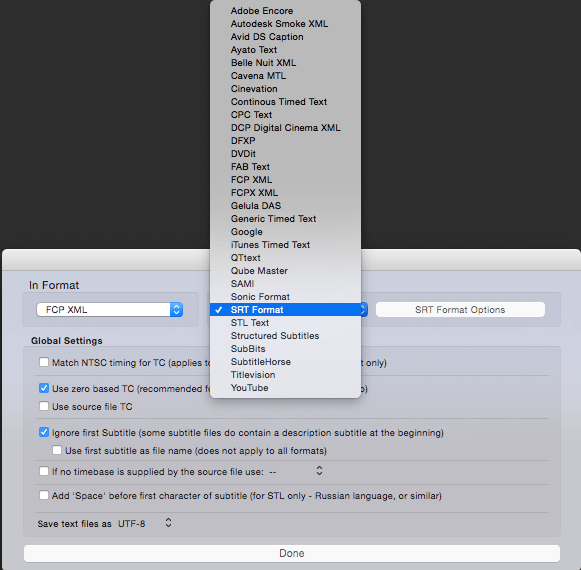
The above screenshots are taken from Title Exchange Software which can be purchased for a donation from here… http://www.spherico.com/filmtools/TitleExchange/
Note: I am no way paid from TitleExchange and I purchased this software by paying it.
How to get files for Title Exchange is based on what software you are using.
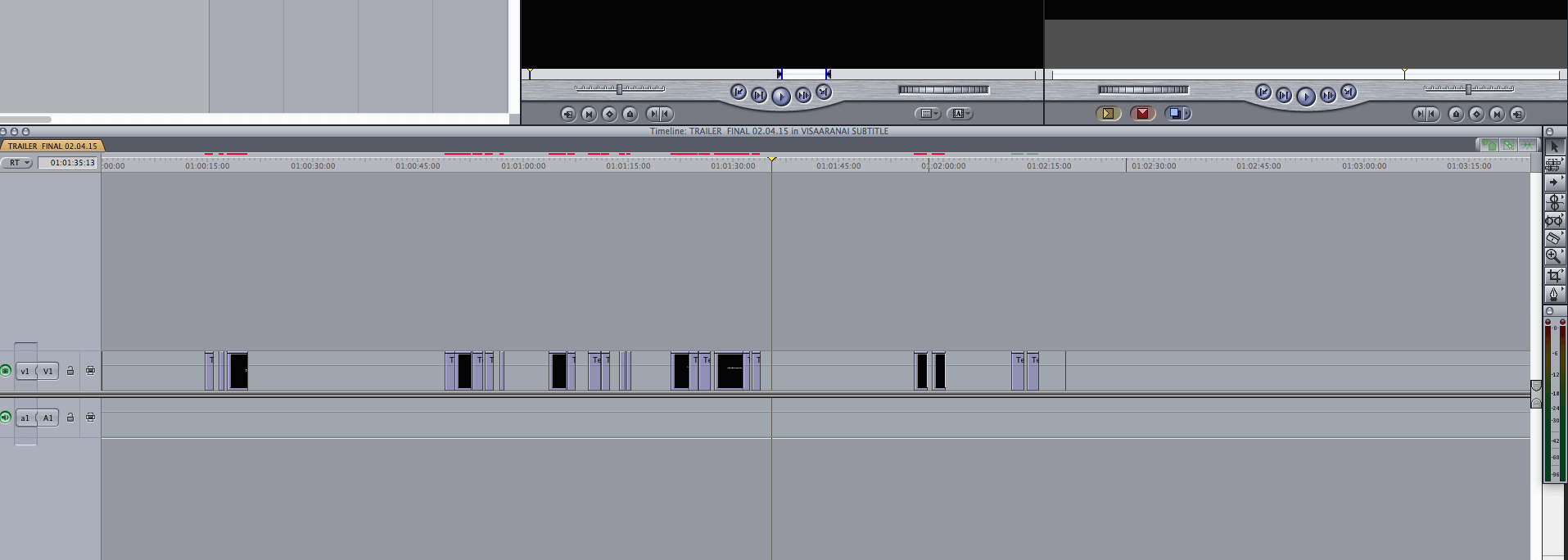
If you use FinalCutpro Place Text layer in appropriate timings in Timeline and export FCP XML to bring it to Title Exchange software.
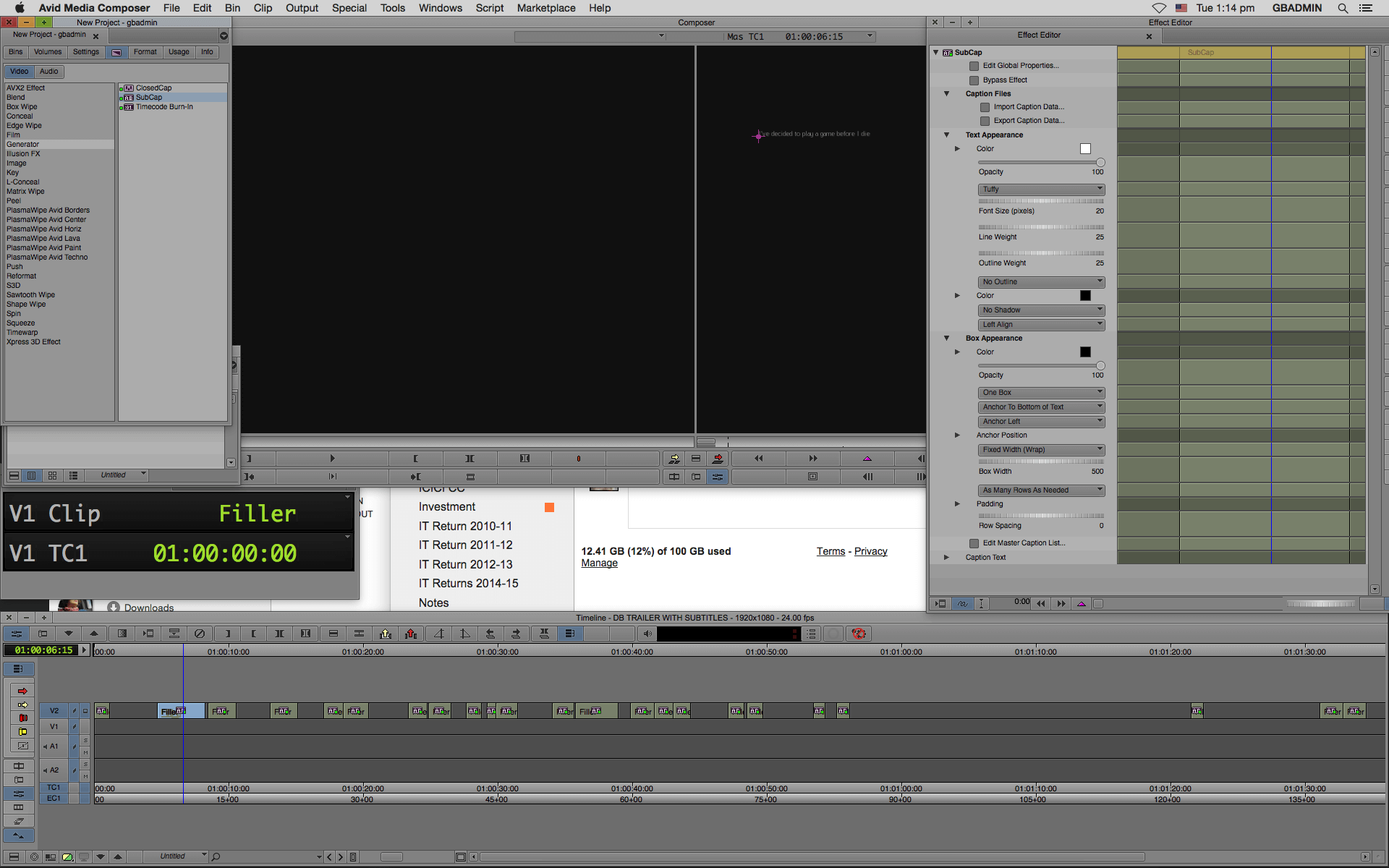
If you use Avid use Avid SubCap Effect and time it based on your subtitle and export as an Avid DS Caption.
If you use Adobe Premiere Pro, You can use their closed captioning feature to spot subtitles and export to suitable format which can be imported to Annotation Edit or Title Exchange.
Once you done your prepartion of spotting your subtitles, you can now bring to either Title Exchange or Annotation Edit to export to your desired output formats from Digital Cinema Print Subtitles to SRT for TV to Blu-ray to DVD to Youtube or anyother Online / Mobile Platforms.
Happy Subtitling.
You can purchase the following software from below links,
Title Exchange:
http://www.spherico.com/filmtools/TitleExchange/
Annotation Edit:
http://www.zeitanker.com/content/tools/zeitanker_tools/zeitanker_annotation_edit/
Note: Since Adobe Premiere Pro doesn’t allow to use their text formats to translate to other formats, its not possible to use Adobe Premiere Pro except you use their Closed Caption.